Table of Contents
ZeroTick: Making Windows Problems Easier to Understand
Some of the most frustrating Windows problems are not catastrophic failures. They are the small, intermittent ones the system barely explains: a removable drive that refuses to eject even though no file appears to be open, Wi-Fi or Bluetooth hardware that suddenly disappears, a USB device that repeatedly disconnects, audio that stops without an obvious cause, or a blue screen that leaves behind little more than an opaque code.
I created and open-sourced ZeroTick with the help of Cursor and Codex to bring these scattered troubleshooting paths into a clearer interface. ZeroTick is a lightweight diagnostics and real-time tracking tool for Windows 10 and 11. It covers network, audio, removable storage, Bluetooth, devices and drivers, blue screens, and ports, and offers repair actions when they can be performed safely. Source code and installers are available in the GitHub repository.
Why build another Windows diagnostics tool?
Windows already includes powerful administrative tools: Device Manager, Event Viewer, the Services console, Resource Monitor, PowerShell, and many others. The problem is rarely a lack of data; it is that the data is spread across different interfaces and usually presented for people who already understand Windows internals.
When a Bluetooth mouse briefly stops responding, most people want a few straightforward answers: did the device actually disconnect, how long did the interruption last, and does the evidence point to the accessory, the adapter, or a Windows service? The available clues may instead be a device instance path, a service name, or an event that is easy to miss. Audio and removable-storage problems often require the same kind of manual reconstruction across several tools.
ZeroTick does not try to replace those system utilities. Instead, it organizes their scattered signals into results that are easier to act on. The standard view prioritizes a recognizable device name, the practical impact, and a useful next step. Advanced mode exposes the underlying instance IDs, PIDs, service states, raw errors, and debugger evidence when a deeper investigation is necessary.
What ZeroTick helps you investigate
Intermittent USB and Bluetooth disconnects
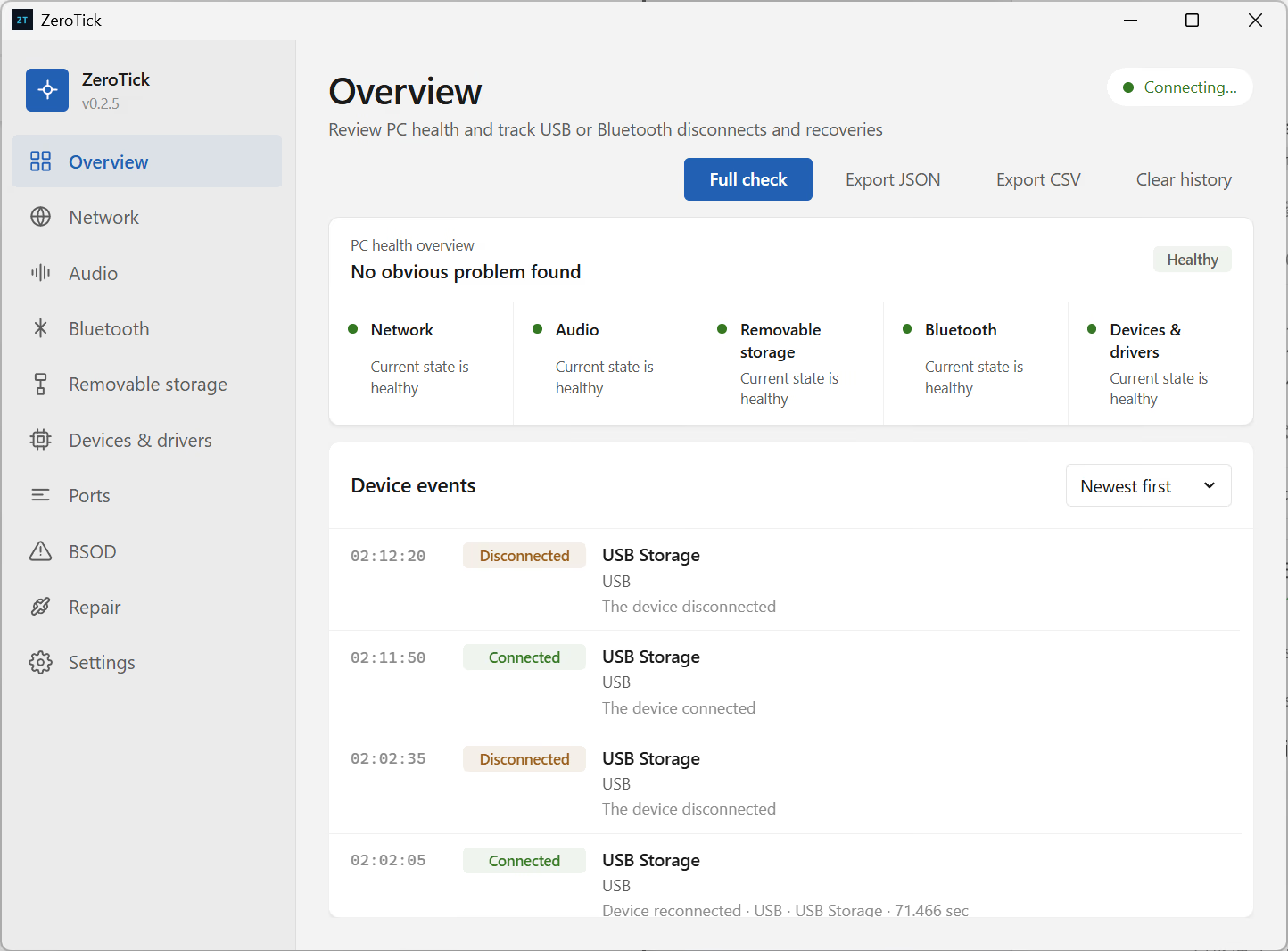
ZeroTick can stay quietly in the system tray and listen for Windows device-change events. When a device disconnects and returns, the timeline records the real interval. Durations below one second are shown in milliseconds; longer durations use seconds while retaining the available millisecond precision.
The standard view prefers the friendly name or product description reported by Windows and the device itself. Generic labels such as USB Composite Device, VID/PID pairs, and long instance paths are not presented as if they were product names. They remain available in Advanced mode when a driver node must be identified precisely.
This history answers a useful but limited question: did Windows actually remove the device, or was only an application temporarily unresponsive? A single event cannot prove that hardware is defective, but a reliable timeline is a better starting point for investigating power, ports, drivers, firmware, or the peripheral itself.
One place for common diagnostic paths
The Network page checks active adapters, the default gateway, DNS, essential services, VPN and proxy configuration, and—when possible—the application using a local proxy. The Audio page shows playback and recording endpoints, the current default, volume, mute state, and shared or exclusive policy. Audio changes are read back from Windows, so the interface reports success only when the resulting state matches the request.
Removable storage is grouped by physical device rather than displayed as a confusing collection of unrelated volumes. ZeroTick distinguishes mounted volumes, locked media, volumes without drive letters, inaccessible media, and empty card-reader slots. If safe removal fails, it reports the locking program or the veto returned by Windows when that information is available, instead of stopping at a generic error.
The Bluetooth page checks the adapter, drivers, support service, and paired peripherals. For devices that expose battery information, ZeroTick reads the Windows property cache or the standard GATT Battery Service and displays the remaining charge. Separate pages cover Device Manager errors, port ownership and carefully limited release actions, and blue-screen investigation using Minidumps, BugCheck records, and WinDbg evidence when available.
A repair button that must do real work
Diagnostic software becomes misleading when “a command was launched” is treated as “the problem was fixed.” ZeroTick follows a diagnose–act–verify model wherever Windows provides a reliable verification path. Services that are already healthy are left untouched. Operations that require elevation say so clearly. Audio settings are read back after writing. A releasable development process must actually exit before the port action is reported as successful. Operations for which Windows exposes no supported mechanism are not presented as working features.
This also means that one-click repair is intentionally limited. Hardware failures, vendor drivers, firmware, security software, and damaged system files may call for evidence and guidance rather than risky automated changes. ZeroTick is designed to narrow the problem without pretending that every failure has a safe, universal fix.
Getting started
- Download the latest Windows installer from GitHub Releases. Each release provides an NSIS
.exe, an MSI package, andSHA256SUMS.txt. - Launch ZeroTick and begin in the standard view. Open Overview, then the page that matches the symptom you are investigating.
- For intermittent problems, minimize the app to the tray and continue using the computer normally until the issue happens again.
- Read the reported impact and guidance before choosing Repair. Changes to services, devices, or audio policy may require restarting ZeroTick as administrator.
- Enable Advanced mode only when you need evidence for an issue report, an exact driver node, or a more technical investigation.
The Settings page lists every supported interface language. English is bundled as the offline fallback, while other version-matched language packs can be downloaded on demand. On first launch, ZeroTick selects the closest match from the Windows language preference list. This keeps the installer small without advertising incomplete or unvalidated translations.
A practical troubleshooting example
Suppose a Bluetooth mouse loses its connection briefly each day even though the Windows Bluetooth panel looks normal. Start by checking the adapter, support service, peripheral state, and battery level in ZeroTick. Leave the app in the tray. After the next interruption, review the Overview timeline.
If Windows reported a real removal and recovery for the same device, the recorded duration points to practical checks such as battery level, power management, USB adapter power, and driver health. If no device event exists, it is more productive to investigate the application, radio interference, or the input stack than to assume that Windows removed the hardware.
The same evidence-first approach applies elsewhere. For a drive that will not eject, inspect locking programs and the Windows veto. For missing audio, check the selected endpoint, volume, mute state, and services. For a blue screen, keep the general meaning of the stop code separate from stronger evidence that actually names a driver or module. ZeroTick deliberately preserves that distinction instead of turning a plausible guess into a confident claim.
Privacy, safety, and limits
Diagnostics run primarily on the local computer. Device history is not uploaded merely because a scan is performed. Network or file operations occur only in response to explicit actions such as checking for updates, downloading a language pack, opening a project link, or exporting a report.
Potentially destructive actions—including formatting storage or removing a Bluetooth pairing—require clear confirmation. Port cleanup is restricted to a narrow set of development processes that are safe to terminate; it does not treat reserved ports or ordinary application connections as disposable.
Current installers are not code-signed, so Windows may display a security warning. Download only from the project’s GitHub Releases and verify the file against the accompanying SHA-256 list. ZeroTick is not antivirus software, a data-recovery suite, or a hardware stress-testing tool. Back up important data and use vendor diagnostics or professional repair services when storage hardware is failing or crashes continue.
Why open source matters here
ZeroTick is released under the MIT License. For a system diagnostics application, access to the source code is more than a collaboration model—it is part of the trust model. Anyone can inspect what a scan reads, what a repair changes, which conclusions are supported by Windows evidence, and which outputs are recommendations rather than facts.
If you find an unrecognized device, a misdiagnosis, a translation problem, or a button whose behavior does not match its label, please open a report in GitHub Issues or email support@physchen.com. Real-world cases are the best way to make ZeroTick a simpler and more dependable Windows troubleshooting tool.